Craft SwitcherGet the kit
An independent field guideVOL. 01 / OCTOBER 2026

Your next creative chapter

ArtCraft: The Free, Open-Source Adobe Alternative Suite

ArtCraft is a collection of free, open-source creative apps from Storyteller.ai, built in Rust for desktop and, where available, the browser.

Independent guide · Last updated 2026-10-14

Free creative apps Open-source code Desktop + selected web buildsExplore the guide

01 / The big picture

ArtCraft at a glance

ArtCraft brings image editing, vector illustration, video editing and more into a family of open-source creative tools. The official directory currently lists thirteen apps. This guide focuses on seven creative workflows, with practical notes on file compatibility and the early-stage status of each app.

Made byStoryteller.ai
Built withRust
LicenseMIT or Apache-2.0¹
PlatformsMac · Windows · Linux
Official lineup13 apps · 7 in this guide
DevelopmentEarly alpha / in development

¹ Check the license in each repository for the app and its components. Features and availability change by release.

02 / Start at the source

How to download ArtCraft safely (official links only)

ArtCraft downloads should start at the official website or the storytold organization on GitHub. The ArtCraft Launcher offers a central way to install and update the apps. This independent guide links to those sources directly; it does not distribute installers or provide modified application builds.

A quick check before you install

Confirm the storytold owner, established commit and release history, and the exact link from the official website. Keyword-stuffed repository descriptions and unsolicited .7z or .run archives are reasons to stop and verify. We never host application binaries.

03 / Image editing

PhotoCraft – Free Photoshop Alternative

PhotoCraft is an open-source image editor in the ArtCraft family, designed around familiar layered editing workflows. Its repository documents PSD and PSB handling, a brush engine and Color Lookup support. Treat file compatibility as something to test on copies, especially when your project uses complex Photoshop features.

What to explore

  • Layered PSD / PSB workflows
  • Color Lookup: .cube, .3dl and .look
  • Brush engine and custom brush tips

Moving from Photoshop

  • Test layered round trips before switching.
  • Keep original PSD files and export a reference image.
  • The kit includes PNG brush tips and .cube LUTs.
Read compatibility notes (opens in a new tab)

04 / Vector illustration

VectorCraft – Free Illustrator Alternative

VectorCraft is an open-source vector illustration app in the ArtCraft suite, aimed at familiar drawing and layout tasks. Its documented interchange includes SVG, PDF and PDF-compatible Illustrator files. Keep source artwork intact and compare the exported result carefully, especially for fonts, appearance effects and complex imported artwork.

What to explore

  • Vector paths and illustration tools
  • SVG and PDF interchange
  • PDF-compatible .ai files

Moving from Illustrator

  • A PDF-compatible .ai file is not every Illustrator file.
  • Check fonts, strokes and effects after import.
  • Export a proof PDF before handing work to a client.
Read compatibility notes (opens in a new tab)

05 / Video editing

FilmCraft – Free Premiere Pro Alternative

FilmCraft is the ArtCraft video editor, with a familiar editing workspace and documented timeline interchange. Its repository describes formats including Final Cut Pro XML, AAF and OpenTimelineIO. Plan a deliberate handoff from Premiere Pro, checking media, timing and effects instead of assuming a native project will transfer unchanged.

What to explore

  • Timeline editing and familiar panel layouts
  • FCP7 XML, AAF and OTIO interchange
  • Video export and background rendering

Moving from Premiere Pro

  • Use an interchange export instead of relying on .prproj.
  • Relink media and review transitions after import.
  • The kit LUTs are files; built-in styles are separate.
Read compatibility notes (opens in a new tab)

06 / Photo library & RAW

LightCraft – Free Lightroom Alternative

LightCraft is an open-source photo library and RAW developer in the ArtCraft suite. Its repository documents XMP sidecars, presets and a growing camera support matrix. Test your own camera files, lens corrections and rendered colors before migrating a library; format support does not guarantee an identical Lightroom result.

What to explore

  • Photo library and RAW development
  • XMP sidecars and presets
  • Camera support tracked in the repository

Moving from Lightroom

  • Try a small copied collection before your full catalog.
  • XMP settings may render differently between applications.
  • The kit includes twelve .xmp preset starting points.
Read compatibility notes (opens in a new tab)

07 / PDF workbench

PdfCraft – Free Acrobat Alternative

PdfCraft is the ArtCraft PDF workbench for reading, organizing, combining, splitting and securing documents. It is presented as a native open-source application, with official builds for several platforms. Use a copy of important documents and check exported pages, forms and annotations before replacing your existing PDF workflow.

What to explore

  • Read and annotate PDF documents
  • Combine, split and reorder pages
  • Native desktop and web options

Moving from Acrobat

  • Check forms and signatures on your own documents.
  • Compare page order and rendering after export.
  • Keep the original PDF when testing a new version.
Read compatibility notes (opens in a new tab)

08 / Motion graphics & VFX

EffectCraft – Free After Effects Alternative

EffectCraft is an open-source motion graphics and visual effects app in the ArtCraft family. It targets composition-based creative work, with ongoing development documented in its repository. Start with a small test composition and verify the output you need before moving a production project or relying on existing plug-ins.

What to explore

  • Motion graphics and visual effects
  • Composition-oriented workflows
  • Open development and issue tracking

Moving from After Effects

  • Do not assume existing plug-ins will transfer.
  • Render a reference clip for visual comparison.
  • Test the specific effects your project depends on.
Read compatibility notes (opens in a new tab)

09 / Page layout & publishing

DesignCraft – Free InDesign Alternative

DesignCraft is the ArtCraft app for page layout and publishing, built as an open-source tool in Rust. It is still in development, so a careful document handoff matters. Begin with a short sample, then check typography, page geometry and exported output against your original before using it for delivery.

What to explore

  • Page layout and publishing
  • Native Rust application
  • Official installers and source code

Moving from InDesign

  • Check text flow and font substitution page by page.
  • Verify print requirements with your print provider.
  • Retain your original publication and a reference PDF.
Read compatibility notes (opens in a new tab)

10 / Choose by workflow

ArtCraft vs Adobe vs other free apps

ArtCraft is an emerging alternative for creative work, with a focus on native open-source apps and familiar workflows. Adobe remains a different ecosystem of mature tools, cloud services and integrations. Established free apps are another option. Choose by the files and features your work actually needs.

Applications to consider for seven creative workflows; not a feature-parity claim.
Your workflowArtCraftAdobeOther free options
Image editingPhotoCraftPhotoshopGIMP / Krita
Vector illustrationVectorCraftIllustratorInkscape
Video editingFilmCraftPremiere ProKdenlive / Shotcut
RAW developmentLightCraftLightroomdarktable / RawTherapee
PDF workbenchPdfCraftAcrobatPDF Arranger
Motion graphicsEffectCraftAfter EffectsBlender / Natron
Page layoutDesignCraftInDesignScribus

A starting-point comparison, not a claim of equal features or identical file compatibility.

11 / Get set up

How to install ArtCraft on Mac, Windows, Linux and in the browser

ArtCraft installation depends on your operating system, processor and the app you choose. Start with the official app page or ArtCraft Launcher, then select the matching installer. Keep original project files and test copies first. Browser availability varies, so check the individual app page before proceeding.

01

macOS

Choose the official build for Apple Silicon or Intel. Follow the release instructions and keep a copy of your original projects.

ArtCraft can’t be opened on Mac: fix

Verify the source and architecture first. Follow the project and Apple’s documented guidance for a trusted app; keep system-wide security controls enabled.

02

Windows

Choose the installer matching your system from the app’s official page. Verify the release and follow the installation instructions. Use copied files for your first test.

03

Linux

Check the app page for packages appropriate to your distribution and processor. Follow that release’s instructions, then test import and export on a small project.

12 / Optional AI tools

ArtCraft AI studio: models, credits and pricing

ArtCraft creative apps are free to use, while hosted AI generation is a separate service with credits and its own pricing. Buying the Craft Switcher Kit does not include AI credits. Check the official pricing page for current model availability, account requirements and any paid AI options.

Creative apps and hosted AI have separate pricing.

Use the current official pricing page to compare AI options. No AI credits are bundled with this kit.

See official AI pricing (opens in a new tab)

13 / Your weekend starting point

Craft Switcher Kit: switch from Adobe in a weekend

Craft Switcher Kit is an independent collection of guides and creative assets for exploring an Adobe-to-ArtCraft workflow. It combines migration notes, shortcut references, color LUTs, photo presets and brush tips in one download. You pay once for the kit; the ArtCraft software itself remains free.

01

Migration guide

A practical PDF covering 13 topics, from file handoffs to a calmer first week.

02

Shortcut cheat sheet

A printable PDF with quick references for four creative apps.

12

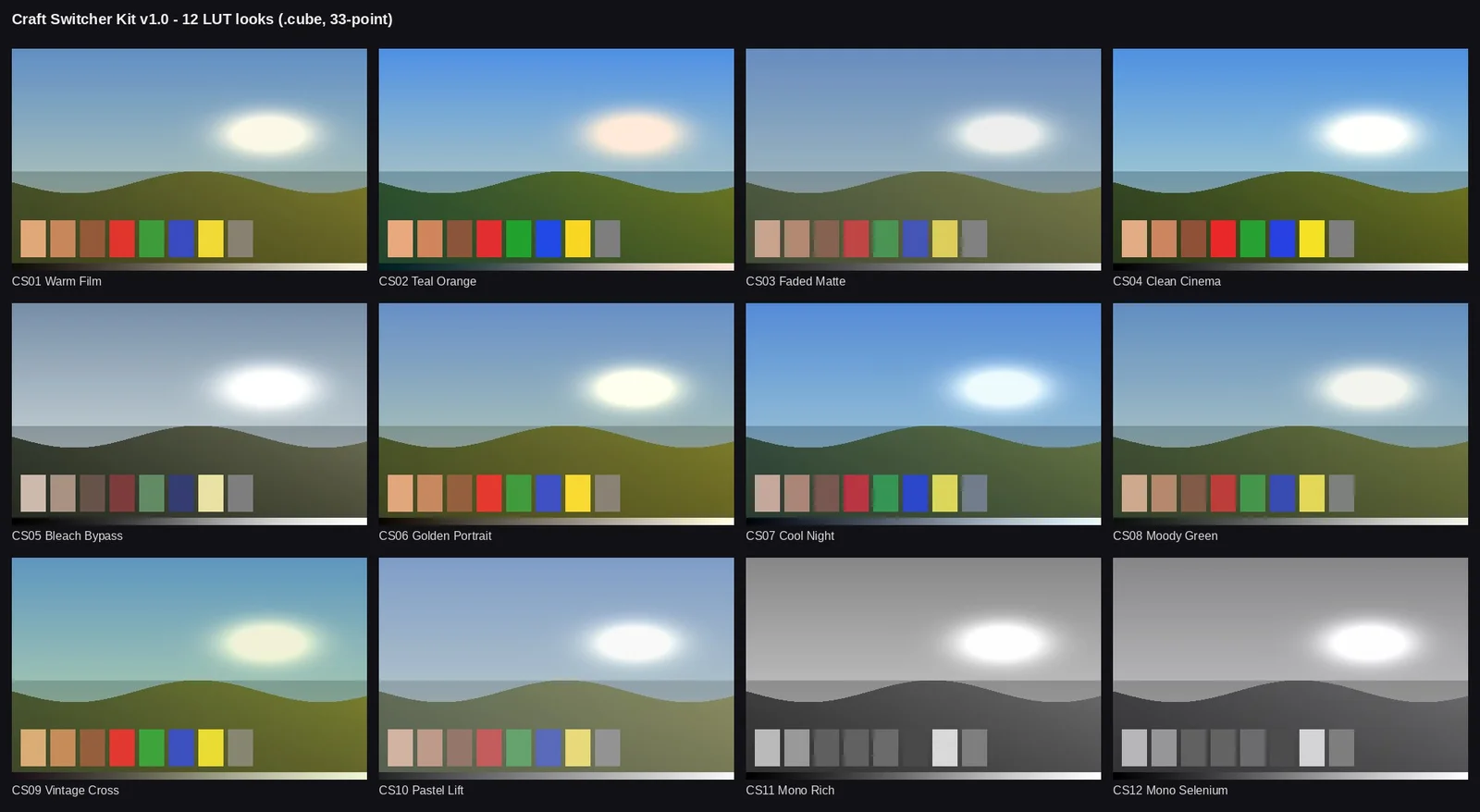
Color grading LUTs

.cube files with a visual contact sheet so you can choose a look.

12

LightCraft presets

Editable .xmp starting points for your photo workflow.

16

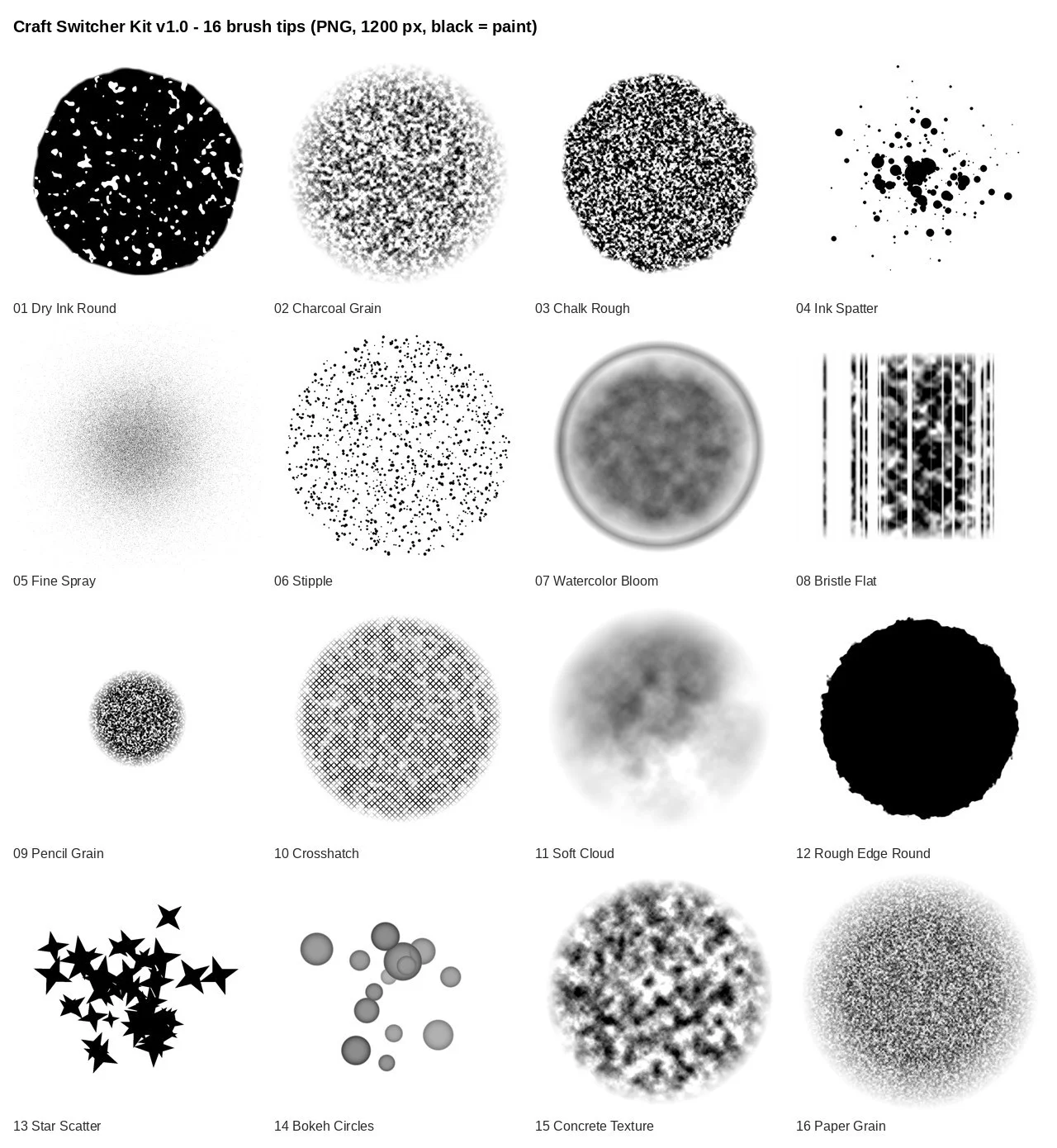
PhotoCraft brush tips

PNG brush shapes to import through Define Brush from Selection.

+

The small essentials

Preview images, a start-here file, license and version history.

Assets are supplied for you to test in your workflow. We have not independently verified every file in every ArtCraft release.

Contact sheet of the twelve color LUTs included in Craft Switcher Kit
01 / COLOR STUDIESActual LUT preview sheet from the kit
Contact sheet of the sixteen PNG brush tips included in Craft Switcher Kit
02 / MAKE YOUR MARKActual brush tip contact sheet from the kit

ArtCraft itself is free. You’re paying for our guide and assets, not the software.

14 / A realistic starting point

Is ArtCraft ready to replace Photoshop? An honest review

ArtCraft is worth exploring if you can test an emerging tool alongside your existing workflow. It is not a promise of complete Adobe compatibility. Start with a duplicate project, check import and export results, and keep your established tools available until your essential work survives the round trip.

Explore now

Personal projects, learning and experimentation, where you have time to test new tools and report issues.

Run both

Mixed creative work. Try a complete round trip in ArtCraft while keeping your current tools for production.

Wait for your essentials

Deadline-critical work that depends on specific plug-ins, exact color output or complex proprietary formats.

The official directory labels PhotoCraft and PdfCraft “Early alpha” and the other five apps covered here “In development”. This guide is based on published documentation, not a hands-on benchmark.

Check current official status (opens in a new tab)

15 / Before you switch

ArtCraft FAQ

ArtCraft is changing quickly, so the most useful answers distinguish official product facts from practical migration advice. These questions cover price, downloads, compatibility and the independent Craft Switcher Kit. For new releases or feature changes, follow the linked official app pages and repositories before making a workflow decision.

What is ArtCraft?

ArtCraft is a suite of free, open-source creative apps from Storyteller.ai. The official directory lists thirteen apps; this guide focuses on seven workflows for image editing, illustration, video, photography, PDFs, motion graphics and publishing.

Is ArtCraft free?

The creative apps are free and open source. Hosted AI features have separate credits and pricing. Craft Switcher Kit is an optional paid guide and asset bundle, not a software license.

Is ArtCraft safe to download?

Use getartcraft.com and the storytold organization on GitHub. Confirm the repository owner and release history, and inspect checksums where provided. An official source is a verification step, not a guarantee that every early build is free of bugs.

Who made ArtCraft?

ArtCraft is from Storyteller.ai. Official source repositories are published under the storytold GitHub organization. This independent site is not part of that team.

Is ArtCraft written in Rust?

The official app directory describes the creative applications as native apps built in Rust. Several also have WebAssembly builds for the browser; check the individual app page for availability.

Is ArtCraft open source?

Yes. Official repositories provide the source and license files. The core repositories reviewed for this guide use MIT or Apache-2.0 licensing; consult the license for the specific app and any bundled components.

Can PhotoCraft open Photoshop files?

PhotoCraft documents PSD and PSB support. Complex text, effects, smart objects or other features may behave differently, so test a duplicate document and compare a round-trip export.

Can VectorCraft open Illustrator files?

The documented route includes PDF-compatible .ai files as well as SVG and PDF. Save a PDF-compatible copy in Illustrator and check fonts, effects and geometry after import.

Can FilmCraft open Premiere Pro projects?

Plan to exchange timelines through documented formats such as FCP7 XML, AAF or OTIO. Do not assume direct .prproj compatibility. Relink media and inspect timing, transitions and effects.

Can I use Lightroom presets in LightCraft?

LightCraft documents XMP sidecar and preset support. Presets are a starting point: camera profiles and processing differences can change the result. Test on copies of your own RAW files.

Why won’t ArtCraft open on my Mac?

First check the app source, processor architecture and current installation instructions. If macOS blocks a verified official build, follow Apple’s guidance and the project’s documented installation steps. Do not disable system-wide security controls.

Does ArtCraft work on Windows, Linux and the web?

The official directory lists macOS, Windows and Linux builds for the apps covered here. Most also list a web option; FilmCraft is listed for desktop. Availability can change by release.

Is ArtCraft ready for professional work?

Several apps are early alpha or in development. Test the formats, export quality and reliability your work needs. Keep existing tools available for deadline-critical projects until you have verified your own workflow.

What comes with Craft Switcher Kit?

Version 1.0 includes a migration guide PDF, shortcut sheet PDF, twelve .cube LUTs, twelve .xmp presets, sixteen PNG brush tips, previews, a README, license and changelog. Video lessons are not included in v1.0.

Is this the official ArtCraft kit?

No. Craft Switcher Kit is an independent guide and asset bundle. It is not affiliated with or endorsed by ArtCraft, Storyteller.ai or Adobe, and it does not include their software.

How do payment, downloads and refunds work?

The kit costs $19 USD once, using Stripe or PayPal when purchases are open. After payment is confirmed, download the latest kit from your account. Free updates cover ArtCraft 1.x. Request a refund within fourteen days through account support; completed refunds end download access.

Sources & editorial notes

Checked 2026-10-14. Product facts come from the official sources below; migration suggestions are our editorial guidance.

One project. One new possibility.

Your tools can change.
Your creativity stays yours.

Get the Switcher Kit — $19